
If you’re looking to simplify your routines, increase energy efficiency, and make your living space more intuitive, you’re likely exploring the practical steps to building a smart home system that actually works. The challenge isn’t finding devices—it’s knowing which technologies integrate seamlessly, support your wellness goals, and enhance everyday organization without creating digital clutter.
This article breaks down the essentials: how to choose compatible platforms, prioritize high-impact upgrades, and design automations that genuinely improve daily life. Instead of chasing trends, we focus on sustainable, user-friendly solutions that align with modern home concepts and long-term functionality.
Our guidance is grounded in hands-on testing, real-world implementation strategies, and continuous evaluation of emerging smart technologies. By the end, you’ll have a clear roadmap to create a connected home that feels purposeful, efficient, and tailored to your lifestyle—not overly complicated or overwhelming.
Beyond smart plugs, many homes hide a messy truth: drawers stuffed with devices, each trapped in its own app. The promise was simplicity; the reality is fragmentation. If you’re building a smart home system, the goal isn’t more gadgets—it’s cohesion. I’ll admit, standards evolve and no single hub solves everything yet. Still, a clear framework helps:
- Choose a central ecosystem and commit.
- Map routines before buying hardware.
- Automate for wellness and efficiency, not novelty.
Some argue separate apps offer flexibility. Maybe. But integration creates anticipation—lights dim, air cools, doors lock—without you lifting a finger. Almost like magic.
The Core Component: Choosing Your System’s Central Hub
If you’re serious about building a smart home system, a dedicated hub isn’t optional—it’s foundational. Think of a hub as the brain of your setup: it processes commands locally (meaning inside your home, not on a distant server), which makes everything faster and more reliable. When the internet drops, cloud-only devices often fail. As one frustrated homeowner told me, “My lights shouldn’t stop working because my Wi‑Fi blinked.” Exactly.
That’s where communication protocols come in. Zigbee and Z-Wave are low-power wireless standards designed specifically for smart devices; they create mesh networks (devices relay signals to each other), improving range and stability. Matter is the newer universal language aiming to unify brands under one standard. Some argue Wi‑Fi devices are simpler—“Why add another hub?” they say. Fair point. But Wi‑Fi congestion, latency, and cloud dependence can become bottlenecks (especially in larger homes).
A multi-protocol hub supports several of these standards at once—your best bet for future-proofing.
Now, philosophy. DIY platforms like Home Assistant offer granular control and customization. Commercial hubs like Hubitat prioritize quicker setup and polish. One user put it well: “Do you want a workshop or an appliance?”
Before buying anything, map your top three automations—“morning routine,” “movie night,” “away mode.” Let your vision define the hardware.
Layer 1: Automating Ambiance for Wellness and Convenience
Smart lighting should do more than flip on and off. It should support your biology. Circadian rhythm lighting—systems that adjust color temperature (the warmth or coolness of light measured in Kelvins)—mimics the natural progression of daylight. Cool, blue-enriched light in the morning promotes alertness, while warmer tones at night encourage melatonin production and better sleep (Harvard Health Publishing). In other words, your bulbs can work like a silent wellness coach.
Some critics argue this is overkill—“Can’t I just use a lamp?” Technically, yes. But manual control rarely matches the precision of tunable white bulbs programmed to shift automatically throughout the day. The difference is subtle, yet cumulative (like switching from instant coffee to freshly ground beans).
Next, integrate smart blinds with your lighting. A gradual “wake-up” scene can raise shades while lights brighten from 2200K to 4000K over 20 minutes. This layered sunrise feels natural, not abrupt. Competitors often stop at bulbs; pairing daylight harvesting with automation is where real comfort—and energy efficiency—happens.
For nighttime, motion sensors can trigger dim, amber pathway lighting at 10–20% brightness. This avoids harsh, sleep-disrupting glare while guiding you safely to the kitchen. Pro tip: keep late-night lighting under 2700K to minimize circadian disruption.
Finally, embrace layered lighting—combining ambient (general illumination), task (focused work light), and accent (decorative highlights). With one command, your “Evening Wind-Down” scene can dim overheads, warm accent lamps, and close shades simultaneously. When building a smart home system, this orchestration is what separates novelty from true livability.
For a deeper look at performance and efficiency, explore how smart lighting improves comfort and energy savings.
Layer 2: Integrating Climate, Security, and Energy Management
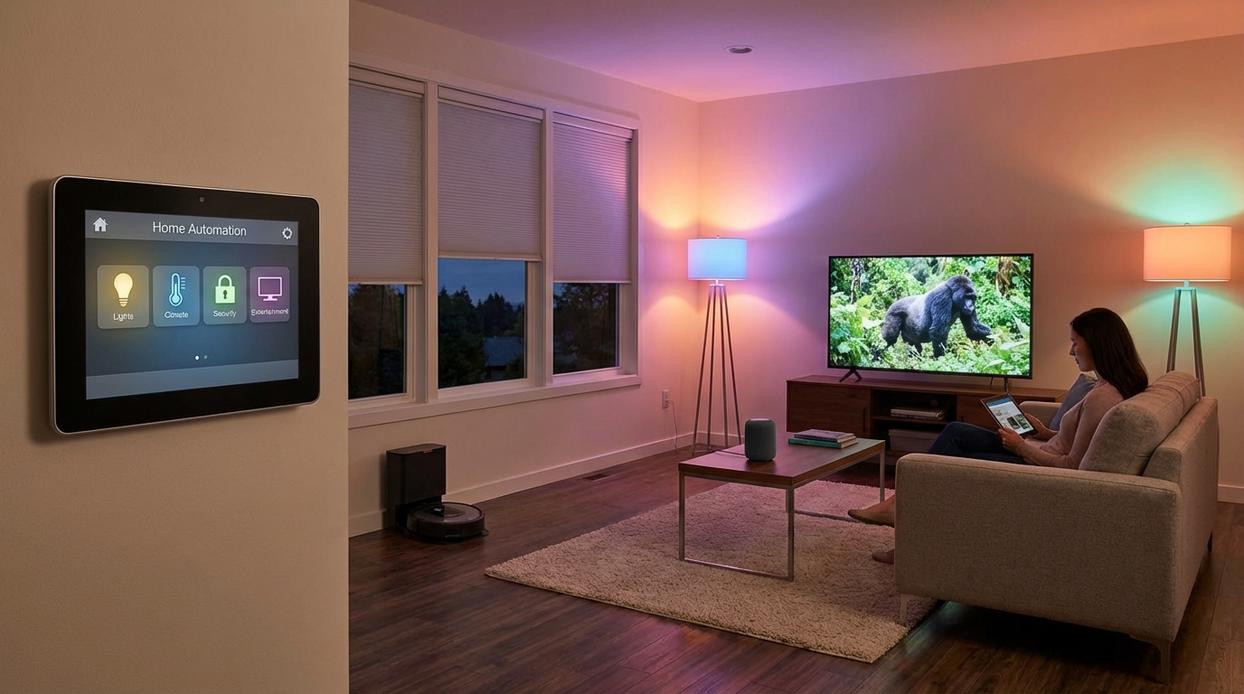
Layer 1 devices are useful on their own. Layer 2 is where they start talking to each other.
Climate Control: Reactive vs. Responsive
A standalone thermostat adjusts temperature on a schedule. Smart—but limited. Pair it with door and window sensors, and you shift from reactive to responsive.
Scenario A: A window is open, but your HVAC keeps running. Energy (and money) drifts right outside.
Scenario B: If a window stays open for more than five minutes, the system automatically pauses heating or cooling and sends a notification. When it closes, climate control resumes.
That small automation can cut heating and cooling waste by up to 30% in some homes (U.S. Department of Energy). Pro tip: set a short delay to avoid false triggers during quick ventilation.
Security Integration: Devices vs. Ecosystem
You could arm cameras manually, lock doors one by one, and leave lights off.
Or you create an “Away” mode:
- Arm cameras
- Lock all smart locks
- Activate a randomized “vacation” lighting pattern
Burglars often look for dark, predictable homes (FBI crime statistics show empty homes are common targets). A lighting pattern that mimics occupancy adds psychological deterrence (think Home Alone, but automated).
Access Control: Basic Entry vs. Smart Arrival
When your smart lock opens after sunset for the first time, entryway and kitchen lights turn on to 50% brightness.
Not blinding. Not dark. Just right.
Energy Organization: Passive Use vs. Active Monitoring
Smart plugs with energy monitoring reveal “vampire power”—devices drawing electricity while idle. TVs, coffee makers, gaming consoles.
Without automation: You unplug manually (rarely happens).
With automation: Nonessential plugs shut off at midnight or when Away mode activates.
That’s the difference between owning gadgets and building a smart home system that works together.
The Final Layer: How to Create Powerful, Multi-Device Routines
A scene (or routine) is a pre-programmed sequence of actions across multiple devices, triggered by one command—voice, button, or event. Think of it as the difference between flipping one switch and conducting an orchestra.
Take a “Movie Night” scene: say the word and lights dim to 10%, bias lighting glows behind the TV, smart blinds close, and the AV system powers on. Conditional logic—if it’s after sunset, then close blinds—makes it intelligent, not just scheduled.
Automation A: isolated devices. Automation B: connected experiences. When building a smart home system, B wins.
Your Home, Intelligently Organized and Effortless
I remember standing in my kitchen, juggling three apps just to turn off the lights and adjust the thermostat (so much for “smart,” right?). That frustration—disconnected devices that refuse to cooperate—is exactly what you’ve now solved.
With a central hub (the command center that unifies devices), thoughtful planning, and layered integration, building a smart home system becomes seamless instead of stressful. In other words, automation finally feels automatic.
Now, here’s your challenge: grab a pen and design one powerful routine—like a “Goodbye” scene that locks doors, dims lights, and adjusts climate. Start there, and watch everything click.
Create a Home That Works for You, Not Against You
You came here looking for practical ways to make your home feel calmer, more efficient, and easier to manage. Now you have a clear path forward — from optimizing daily routines to building a smart home system that simplifies your life instead of complicating it.
Disorganization, wasted time, and constant digital overwhelm can quietly drain your energy every single day. When your home isn’t working well, neither are you. But with the right systems, smart integrations, and intentional routines, your space can finally support your goals instead of slowing you down.
The next step is simple: choose one area to upgrade this week. Automate one task. Declutter one zone. Improve one routine. Small changes compound quickly when they’re done strategically.
If you’re ready to eliminate chaos and create a streamlined, wellness-focused home that actually supports your lifestyle, explore our expert-backed guides and start transforming your space today. Thousands trust our proven home optimization strategies — now it’s your turn to make your home smarter, calmer, and effortlessly organized.
 Valyssa Esthova writes the kind of wellness and home living routines content that people actually send to each other. Not because it's flashy or controversial, but because it's the sort of thing where you read it and immediately think of three people who need to see it. Valyssa has a talent for identifying the questions that a lot of people have but haven't quite figured out how to articulate yet — and then answering them properly.
They covers a lot of ground: Wellness and Home Living Routines, Home Organization Hacks, Current Highlights, and plenty of adjacent territory that doesn't always get treated with the same seriousness. The consistency across all of it is a certain kind of respect for the reader. Valyssa doesn't assume people are stupid, and they doesn't assume they know everything either. They writes for someone who is genuinely trying to figure something out — because that's usually who's actually reading. That assumption shapes everything from how they structures an explanation to how much background they includes before getting to the point.
Beyond the practical stuff, there's something in Valyssa's writing that reflects a real investment in the subject — not performed enthusiasm, but the kind of sustained interest that produces insight over time. They has been paying attention to wellness and home living routines long enough that they notices things a more casual observer would miss. That depth shows up in the work in ways that are hard to fake.
Valyssa Esthova writes the kind of wellness and home living routines content that people actually send to each other. Not because it's flashy or controversial, but because it's the sort of thing where you read it and immediately think of three people who need to see it. Valyssa has a talent for identifying the questions that a lot of people have but haven't quite figured out how to articulate yet — and then answering them properly.
They covers a lot of ground: Wellness and Home Living Routines, Home Organization Hacks, Current Highlights, and plenty of adjacent territory that doesn't always get treated with the same seriousness. The consistency across all of it is a certain kind of respect for the reader. Valyssa doesn't assume people are stupid, and they doesn't assume they know everything either. They writes for someone who is genuinely trying to figure something out — because that's usually who's actually reading. That assumption shapes everything from how they structures an explanation to how much background they includes before getting to the point.
Beyond the practical stuff, there's something in Valyssa's writing that reflects a real investment in the subject — not performed enthusiasm, but the kind of sustained interest that produces insight over time. They has been paying attention to wellness and home living routines long enough that they notices things a more casual observer would miss. That depth shows up in the work in ways that are hard to fake.